

Author
Chatbot Versioning Explained for Developers in 2026
Your team edits a live chatbot prompt to fix something small, and two days later the support queue is full of regressions nobody can trace, with no clean way to roll back. If that scenario sounds familiar, you have a versioning problem. Chatbot versioning (also called prompt versioning or agent versioning) is the practice of treating every prompt, configuration, and behavior-defining artifact as an immutable, uniquely identified software version with metadata, diffs, and rollback paths. It applies to the full stack of chatbot behavior: prompts, tools, policies, and runtime bindings. Without it, teams lose reproducibility, cannot trace regressions to their source, and have no safe path back when a deployment breaks. For professionals running AI chatbots in production, versioning is the difference between a system you can trust and one that surprises you at 2 a.m.
What is chatbot versioning explained in practical terms?
Chatbot versioning treats behavior-defining artifacts as immutable, uniquely identified versions with metadata and rollback paths. Each version gets a unique identifier, typically a semantic version number (v1.2.3) or a content hash, along with metadata that records the author, description, parent version, and target deployment environment. That combination makes every state of your chatbot reproducible and auditable.

The key mechanical insight is that versioning separates what changed from how it was deployed. Applications do not bundle prompts directly into code. Instead, they fetch the active version at runtime from a registry or config service, with caching to keep latency low. Swapping production to a new version is a pointer change, not a code redeploy. This is the same pattern Git uses for branches and tags, applied to chatbot configuration.
Here is what a well-structured version record contains:
- Version ID: A semver string or SHA hash that uniquely identifies this exact configuration
- Parent version: The version this was derived from, enabling diff views and audit trails
- Author and timestamp: Who created it and when, for governance and compliance
- Deployment environment: Whether this version targets staging, canary, or production
- Description: A human-readable summary of what changed and why
Pro Tip: Store prompts outside your application code in a dedicated registry. Tools like PromptMetrics combine Git for content auditability with a fast metadata backend, giving you both a diff history and queryable telemetry in one place.
How versioning improves observability and incident response
Every chatbot call logs the exact version used, which means you can slice metrics by version tag to isolate regressions. Without this, tracing a spike in latency or a drop in response quality to a specific configuration change is guesswork. With it, you pull up the version that went live at the time of the incident and compare it directly to the previous one.
Without versioning, tracing costs, latency, and quality regressions to exact config versions is unreliable.
The operational benefits follow a clear sequence:
- Tagging at call time: Each request records the version ID in logs and telemetry, creating a complete audit trail for compliance and debugging.
- Regression isolation: When a quality metric drops, you filter by version and identify the exact artifact that caused it, rather than scanning all recent changes.
- Rollback with confidence: Because versions are immutable, rolling back means switching a pointer to a known-good version ID. Nothing is overwritten or lost.
- Audit log support: Governance teams get a timestamped record of every version that touched production, which matters for regulated industries like finance and healthcare.
Understanding chatbot terminology around observability helps teams set up the right telemetry from the start, before incidents happen rather than after.
What safe rollout strategies does versioning enable?
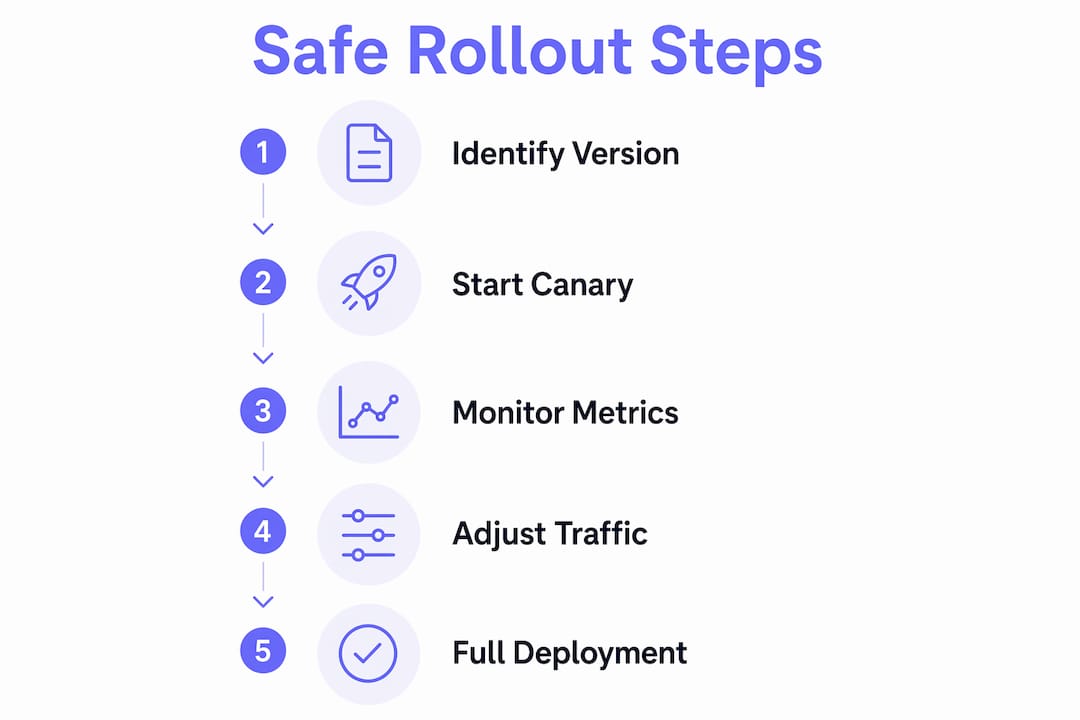
Versioning is the prerequisite for safe, staged deployments. Without immutable version IDs, you cannot split traffic between a current and a candidate version because there is nothing stable to route to. With them, you get a full menu of deployment strategies.
| Strategy | How it works | Best for |
|---|---|---|
| Traffic splitting | Routes a percentage of requests to the new version while the rest go to the current one | Gradual confidence building |
| Canary rollout | Stages traffic at 1%→5%→25%→50%→100% with metrics gating at each step | High-risk prompt changes |
| Shadow mode | New version receives mirrored traffic but responses are not served to users | Pre-production validation |
| Auto-rollback | System reverts to the previous version automatically when error rates exceed a threshold | Overnight and unattended deploys |
Systems like agent-canary implement staged rollouts using finite state machines with minimum durations and success rate gates, automating promotions or rollbacks without manual intervention. That means a bad deploy at midnight gets caught and reversed before most users see it.
Pro Tip: Always define your rollback threshold before you start a canary. Deciding what "bad" looks like after you have already pushed to 25% traffic is too late. Set error rate and latency thresholds in your rollout config before the first request routes to the new version.
For teams building on top of existing chatbot platforms, safe rollout methods like traffic splitting are just as applicable to managed chatbot services as they are to custom-built agents.
Why versioning must go beyond prompts alone
Versioning only the prompt text while leaving tools and policies unversioned is a common mistake that causes silent integration failures. A prompt that worked perfectly with tool version 2.1 may produce broken or dangerous outputs when tool version 3.0 changes its input schema. The comprehensive versioning approach bundles prompts, tools, and policy hashes into a single agent version manifest with compatibility checks.
A complete agent version manifest includes:
- Prompt version: The exact immutable prompt ID used by this agent version
- Tool versions: Pinned versions of every external tool or API the agent calls
- Policy hash: A checksum of the safety and behavior policy applied at runtime
- Compatibility checks: Contract validation gates that block deployment if tool or policy versions are incompatible
- Runtime pinning: The runtime starts each run with a pinned version ID and never discovers a "latest" version mid-run, which would break reproducibility
Treating prompts as public APIs with semantic versions and deprecation policies means downstream consumers get migration paths instead of surprise breakage. This is the same discipline applied to REST APIs, now applied to chatbot behavior.
Key takeaways
Chatbot versioning requires immutable version IDs, bundled manifests, and staged rollout controls to make AI deployments reliable, traceable, and safe to update.
| Point | Details |
|---|---|
| Immutable version IDs | Assign every prompt and config a unique ID so production state is always reproducible. |
| Separate change from deployment | Store prompts in a registry so production switches are pointer changes, not code redeploys. |
| Slice metrics by version | Tag every chatbot call with its version ID to isolate regressions and support audits. |
| Bundle full manifests | Version prompts, tools, and policies together to prevent silent compatibility failures. |
| Use staged rollouts | Gate traffic increases on observed metrics and configure auto-rollback before deploying. |
Why I think most teams version too little, too late
I have seen teams spend weeks debugging a chatbot regression that would have taken ten minutes to trace with proper versioning in place. The pattern is always the same: someone edited the live prompt "just to fix a typo," the change introduced a subtle behavior shift, and three days later the support queue is full. Nobody can reproduce the original behavior because the old prompt no longer exists.
The uncomfortable truth is that most teams treat prompt versioning as a nice-to-have until they get burned. Editing prompt blobs live destroys reproducibility, and no amount of logging recovers what you never saved. The fix is not complicated. Treat your first prompt the same way you treat your first line of application code: put it in version control before it touches production.
The other mistake I see constantly is fetching "latest" at runtime instead of pinning immutable version IDs. It feels convenient until you are trying to reproduce a bug from last Tuesday and the version that ran then no longer exists. Pin your versions. Every run, every environment, every time. It is the single habit that makes everything else in chatbot operations easier.
— Alyssa
How Chatwith supports chatbot versioning and management
Chatwith is built for teams that need reliable, manageable AI chatbots without rebuilding infrastructure from scratch. The platform lets you train custom chatbots on your own content and knowledge bases, then update that knowledge confidently as it changes, with the kind of version management and deployment oversight that production teams depend on. Instead of editing fragile live configurations, you manage one source of truth for your chatbot's behavior, push updates from a single dashboard, and keep responses consistent across every change. You get 24/7 multilingual support across 95+ languages, integrations with over 5,000 applications and APIs, and a setup process that does not require deep engineering resources. For e-commerce teams and customer service operations that need accurate, context-rich responses at scale, Chatwith provides the controls and monitoring to keep chatbot behavior dependable as you iterate.
Build a manageable AI chatbot with Chatwith → — free trial, no credit card required, live on your website in minutes.
FAQ
What is chatbot versioning?
Chatbot versioning is the practice of assigning unique, immutable identifiers to every prompt and configuration change so that deployments are traceable, reproducible, and reversible.
Why does chatbot version control matter for production deployments?
Without version control, regressions cannot be traced to specific configuration changes, and rollback requires manual reconstruction of a previous state rather than a simple pointer switch.
What should a complete chatbot version manifest include?
A complete manifest bundles the prompt version, pinned tool versions, a policy hash, compatibility checks, and runtime pinning to prevent silent integration failures.
How do canary rollouts work with chatbot versioning?
Canary rollouts route a small percentage of traffic (starting at 1%) to a new version, then increase that percentage in stages as metrics confirm the new version performs correctly.
What is the difference between versioning prompts and versioning agents?
Prompt versioning tracks only the text of the prompt, while agent versioning bundles prompts, tools, and policies into a single manifest with compatibility validation across all components.
Recommended
More from our blog
Guide: how to choose the right custom ChatGPT AI chatbot
Explore key factors to select the ideal AI chatbot for your needs, ensuring seamless integration and customer trust.

Why Custom Chatbot Training Outperforms Generic Bots
Discover why custom chatbot training outperforms generic bots, enhancing accuracy and boosting customer satisfaction for your business success!