
Author
How Chatbots Handle Pricing Inquiries Automatically
Your team answers the same pricing question forty times a day, and every slow or inconsistent quote is a deal cooling off while a buyer waits. For B2B and e-commerce teams, that repetitive load is both a cost and a conversion leak. Automated pricing inquiry handling is the process by which an AI chatbot reads a customer's price question, identifies the customer account and context, retrieves live pricing data from backend systems, applies all relevant rules, and returns an accurate quote in seconds without human involvement. Understanding how chatbots handle pricing inquiries automatically is no longer a competitive advantage. It is the baseline expectation. A well-configured chatbot can retrieve pricing from live ERP systems with full rule application and respond across email, chat, and customer portals instantly. The business case is direct: speed, consistency, and scale that no human team can match at volume.
How chatbots handle pricing inquiries automatically
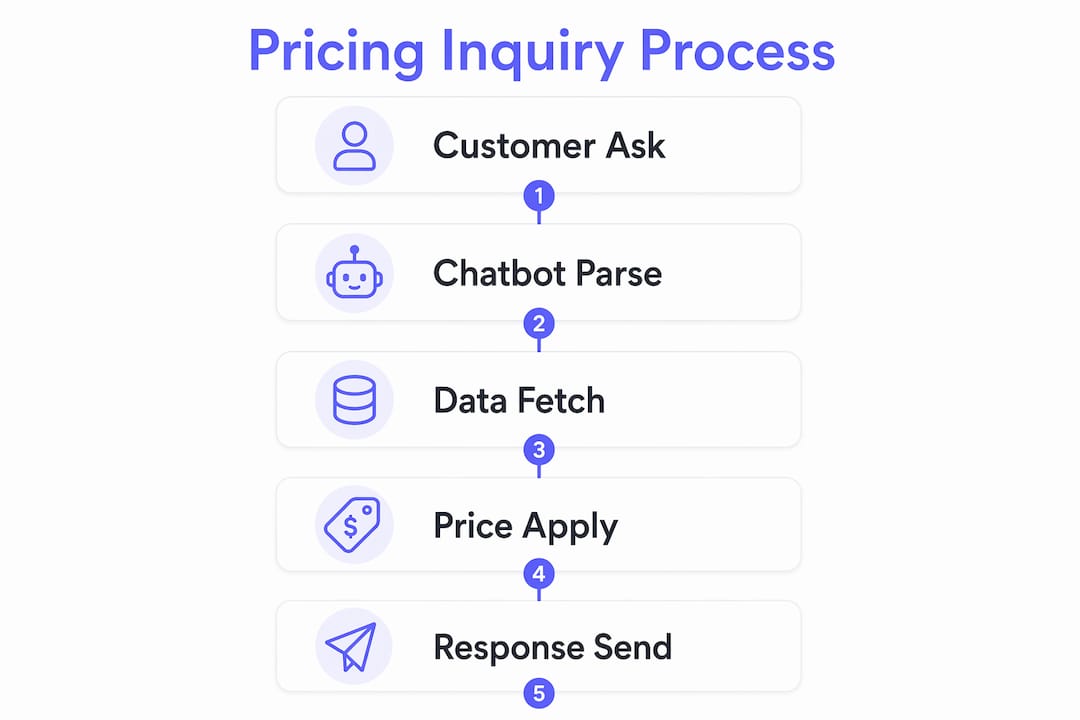
The core process follows a clear sequence. A customer submits a pricing question through any channel. The chatbot parses the request using natural language processing (NLP), identifies the customer account, and pulls the correct pricing record from a connected ERP or Configure-Price-Quote (CPQ) system. CPQ is the industry-standard term for software that manages complex pricing logic, including volume tiers, contract rates, and promotional discounts. The chatbot then applies every applicable rule and returns a price that matches a trained rep's quote, delivered uniformly to every customer who asks.
What makes this process reliable is the integration depth. A chatbot reading from a static FAQ page will quote yesterday's price. A chatbot connected to a live CPQ system quotes today's negotiated rate, including any active promotion. The difference between those two outcomes is the difference between a tool that builds trust and one that erodes it. For B2B e-commerce teams managing hundreds of SKUs and customer-specific contracts, that distinction is the entire value proposition of chatbot pricing automation.
The speed gain is also significant. Where a human agent might take hours to respond to a pricing email, a connected chatbot responds in seconds. This matters most during off-hours, peak seasons, and high-volume inquiry periods when your support team is already stretched.

What technical architecture enables chatbots to answer pricing accurately?
A production-grade pricing chatbot is not a single system. It is a three-layer architecture with distinct responsibilities: a memory layer, an intelligence layer, and an execution layer. Understanding this separation helps you configure and troubleshoot the system correctly.
-
Memory layer. This layer stores plan data, pricing rules, customer tier assignments, inventory status, and contract terms. It is the source of truth the chatbot queries before responding. Without accurate, current data here, every downstream response is compromised.
-
Intelligence layer. AI agents in this layer reason about the customer's question, determine which pricing tier applies, and decide whether the inquiry falls within the bot's configured scope. This is where NLP interprets ambiguous phrasing and where the chatbot decides to answer, ask a clarifying question, or escalate.
-
Execution layer. Once the intelligence layer reaches a decision, the execution layer acts. It triggers a Stripe checkout session, sends a quote notification to a Slack channel, logs a lead in your CRM, or routes the inquiry to a human agent. Taskade's documented workflows show Stripe, Slack, and CRM integrations firing automatically based on chatbot conversation outcomes.
This separation matters because it keeps your conversation logic clean and your execution reliable. A change to your pricing rules updates the memory layer without rebuilding the conversation flow. A new payment gateway plugs into the execution layer without touching the AI reasoning logic.
Pro Tip: Map your pricing rule hierarchy before you configure the memory layer. If your chatbot does not know the priority order between a volume discount and a promotional rate, it will apply whichever rule it finds first, which may not be the correct one.
How do chatbots apply pricing rules and handle complex scenarios safely?
The most common failure mode in chatbot pricing automation is not a technical error. It is a configuration gap where the bot encounters a scenario it was not designed for and either guesses or goes silent. Both outcomes damage customer trust and can cause margin leakage. The correct approach is deterministic fallback: every inquiry path ends in either a confident answer or a defined escalation.
A well-configured pricing bot applies rules in this order:
- Standard tier pricing. The base rate for the customer's account type, pulled directly from the ERP or CPQ.
- Contract rates. Customer-specific negotiated prices that override standard tiers.
- Volume discounts. Quantity-based reductions applied when order size crosses defined thresholds.
- Active promotions. Time-limited discounts layered on top of the applicable base rate.
When the chatbot cannot resolve a pricing inquiry within these layers, it should not guess. Deterministic fallback rules route the inquiry to a human agent, capture the customer's contact information, and log the inquiry type for later review. Documented best practices include a three-attempt classification rule: if the bot fails to classify the inquiry after three attempts, it automatically queues the case for human review rather than continuing to guess.
"Outdated prices are worse than no bot." This is the core operational risk in pricing automation. A chatbot quoting a price that no longer exists does more damage than a customer who simply did not get an answer. Stale data is a trust problem, not just a technical one.
Escalation triggers should be explicit and pre-configured. Common triggers include a user directly requesting a human agent, the inquiry exceeding a preset deal value threshold, a classification failure after multiple attempts, and requests involving custom discount approval. For high-value B2B transactions, discount approval routing to a sales manager queue is standard practice and should be built into the workflow from day one.
Pro Tip: Audit your inquiry logs monthly. The cases your bot escalates most frequently reveal exactly where your pricing logic has gaps. Fix those gaps in the memory layer before they become a pattern.
What are the deployment and integration options for e-commerce chatbots?
Deploying a pricing chatbot is as much an integration project as it is a configuration project. The chatbot is only as accurate as the data it can access, and that data must be current. Stale pricing data is the single most common cause of chatbot pricing errors in production environments.
The table below summarizes the most common integration channels and the automations they support:
| Channel | Integration | Automation triggered |
|---|---|---|
| Live chat widget | ERP/CPQ via API | Real-time price response with tier and discount applied |
| Email inbox | CRM + ERP | Auto-reply with quoted price, lead logged in CRM |
| Customer portal | CPQ + payment gateway | Checkout session created in Stripe upon price confirmation |
| EDI messaging | ERP backend | Automated price acknowledgment sent to buyer's system |
| Internal sales tool | Slack + CRM | Quote notification sent to sales channel, lead updated |
Multi-channel consistency is the operational goal. A customer who asks for a price via live chat and then follows up by email should receive the same number both times. This requires a single source of truth in your ERP or CPQ, not channel-specific pricing configurations. Teams that manage pricing separately per channel introduce the exact inconsistencies that erode buyer confidence.
For teams using chatbot integration strategies to connect backend systems, the setup process typically involves API authentication with the ERP, webhook configuration for real-time data push, and a testing phase with known customer accounts to verify rule application before going live.
How cost-effective is chatbot pricing automation vs. manual handling?
The business case for automating pricing customer service is quantifiable. IBM reports that chatbots handling up to 80% of routine inquiries produce a 30% reduction in customer support costs. That figure represents a structural shift in how support teams allocate time, not just a marginal efficiency gain.
| Metric | Manual handling | Chatbot automation |
|---|---|---|
| Response time | Minutes to hours | Seconds |
| Routine inquiry coverage | 100% human | Up to 80% automated |
| Cost per interaction | Higher (agent time) | Lower (compute cost) |
| Consistency | Variable by agent | Uniform across all channels |
| Availability | Business hours | 24/7 across 95+ languages |
| Scalability | Linear with headcount | Near-unlimited at marginal cost |
The hidden cost in manual pricing inquiry handling is not just agent time. It is the cost of inconsistency. Two agents quoting different prices for the same customer account is a real problem in organizations without centralized CPQ systems. Chatbot pricing automation eliminates that variability by design.
For decision-makers evaluating ROI, the calculation starts with your current inquiry volume, average handle time per pricing question, and fully loaded agent cost per hour. A chatbot that deflects 70% of those inquiries at a fraction of the per-interaction cost typically reaches payback within the first quarter of deployment. Pricing bots also improve conversion by responding immediately rather than making buyers wait, which reduces the drop-off that occurs when pricing information is delayed.
Key takeaways
Chatbots handle pricing inquiries accurately and at scale by combining live ERP/CPQ integration, layered pricing rule application, and deterministic fallback logic that routes complex cases to human agents before errors occur.
| Point | Details |
|---|---|
| Live data integration is non-negotiable | Chatbots must connect to ERP or CPQ systems in real time to avoid quoting stale prices. |
| Three-layer architecture drives accuracy | Memory, intelligence, and execution layers must be configured separately for reliable pricing responses. |
| Fallback rules prevent margin leakage | Deterministic escalation triggers protect against guessing on complex or high-value inquiries. |
| Cost savings are measurable and fast | Automating up to 80% of routine inquiries can cut support costs by 30% or more. |
| Multi-channel consistency requires one source of truth | Pricing must be managed centrally in a single ERP or CPQ to avoid channel-specific discrepancies. |
Why most pricing chatbots fail before they ever go live
I have reviewed a lot of chatbot deployments, and the pattern of failure is almost always the same. The team spends weeks on the conversation design and almost no time on the data architecture. They launch with a memory layer that is either static or refreshed manually, and within days the bot is quoting prices that no longer exist. The customer experience is worse than having no bot at all.
The second mistake I see consistently is treating escalation as an afterthought. Teams configure the bot to answer pricing questions and assume that edge cases will be rare. They are not rare. Complex pricing scenarios, custom discount requests, and multi-product bundle quotes show up constantly in B2B environments. If you have not pre-configured your handoff triggers before launch, your bot will either guess or loop, and neither outcome is acceptable.
My honest recommendation: spend at least as much time on your fallback logic as you do on your conversation flows. Map every scenario where the bot should not answer, and build those triggers explicitly. Then audit your escalation queue weekly for the first two months. The patterns you find there will tell you exactly where your pricing logic needs refinement.
The future of this space is moving toward conversational pricing advisors that can negotiate within pre-approved bands, not just quote fixed rates. That capability requires more sophisticated AI reasoning and tighter CPQ integration than most teams have today. But the teams that get the fundamentals right now, live data, clean fallback rules, and consistent multi-channel delivery, will be positioned to adopt those capabilities without rebuilding from scratch.
— Alyssa
See how Chatwith handles pricing automation for your business
Chatwith builds custom AI chatbots trained on your own content, pricing data, and knowledge base, so every pricing response reflects your actual rates, tiers, and contracts rather than generic answers. The platform connects to over 5,000 applications, including ERP systems, CRMs, and payment gateways, making it straightforward to configure the live data integrations that accurate chatbot pricing automation requires. Fallback and human escalation workflows are configurable without custom code, and the chatbot operates 24/7 across more than 95 languages. If you are evaluating options, the Chatwith pricing page outlines the plans available for e-commerce and customer service teams at different inquiry volumes. You can also explore how to choose the right AI chatbot for your specific pricing automation requirements.
Automate pricing answers with Chatwith → — free trial, no credit card required, live on your website in minutes.
FAQ
How do chatbots retrieve accurate pricing in real time?
Chatbots connect to ERP or CPQ systems via API and pull live pricing data at the moment of each inquiry, applying all customer-specific tiers, contract rates, and active promotions before responding. This eliminates the stale-data problem that affects bots reading from static pages or spreadsheets.
What happens when a chatbot cannot answer a pricing question?
A properly configured pricing bot triggers a deterministic fallback rule, captures the customer's contact information, and routes the inquiry to a human agent or approval queue rather than guessing. Documented best practices recommend a three-attempt classification rule before automatic escalation.
How much can chatbot pricing automation reduce support costs?
IBM data shows that chatbots handling up to 80% of routine inquiries produce a 30% reduction in customer support costs. The savings come from deflecting repetitive pricing questions that would otherwise require agent time.
Which integrations are most important for a pricing chatbot?
The most critical integration is with your ERP or CPQ system for live pricing data. Secondary integrations with Stripe for checkout, Slack for quote notifications, and a CRM for lead capture complete the execution layer that turns a pricing conversation into a business outcome.
Can one chatbot handle pricing inquiries across multiple channels consistently?
Yes, provided all channels query the same backend pricing source. A single ERP or CPQ integration delivers consistent prices across live chat, email, customer portals, and EDI messaging. Channel-specific pricing configurations introduce the inconsistencies that undermine buyer trust.
Recommended
More from our blog

Retrieval Augmented Generation and Reranking in Custom ChatGPT
Learn how using RAG (Retrieval Augmented Generation) and Re-Ranking improve answer quality when working with Large Language Models (LLMs).
How to improve your custom ChatGPT chatbot responses
Why is it crucial to improve your chatbot responses? Learn how you can easily accomplish it by fine-tuning your ChatGPT chatbot using past conversations.